


Videoshop - Video Editor
4.673.23K Reviews
App Specs
- Version
- 2.9.0
- Updated On
- License
- Free
- Downloads
- 10,000,000+
- Developer
- Jajijujejo Inc.
- Categories
- Video Players & Editors
- Platform
- Android
Screenshots
 Analysis by AppCompare
I approach phone video editors with one practical question: can I make a few ordinary clips feel like a small story without turning the process into a project? Videoshop - Video Editor is aimed at that kind of quick, hands-on editing. It is a free video-editing app from Jajijujejo Inc., and its tools cover the everyday jobs I would want to tackle first: trimming, joining clips, adding sound, and giving a finished video a little personality. It is rated 4.7 on average, with around 846,000 ratings, and has passed 10 million installs. Those figures suggest it has found a broad audience, but the more useful question is whether its approach suits the way you like to work.
Getting Started with Videoshop
Diving into Videoshop is like entering a playground for creativity. The first thing you'll notice is its user-friendly interface. You don’t need to be a tech wizard to navigate through this app. Everything is laid out in a way that feels intuitive, which is perfect for those of us who prefer to skip the manual and jump straight into action.
Features That Make a Difference
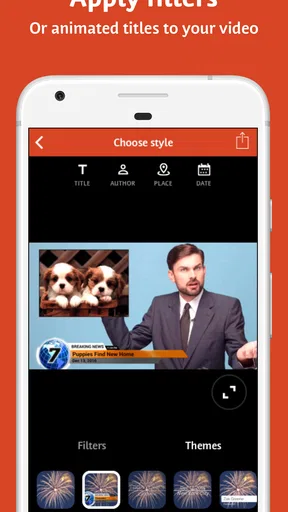
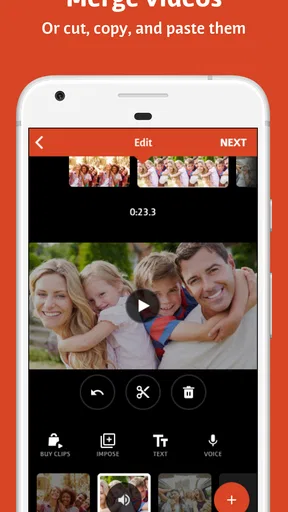
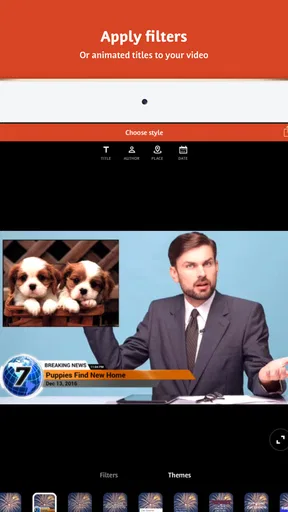
Now, let’s talk features. One of my favorite things about Videoshop is its wide range of editing tools. Whether you want to trim, cut, or merge videos, this app has you covered. And for those of you who love to add a personal touch, there’s a treasure trove of filters and transitions to choose from.
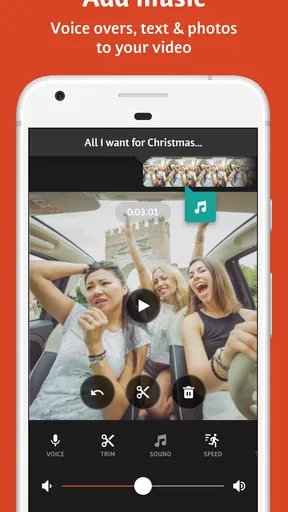
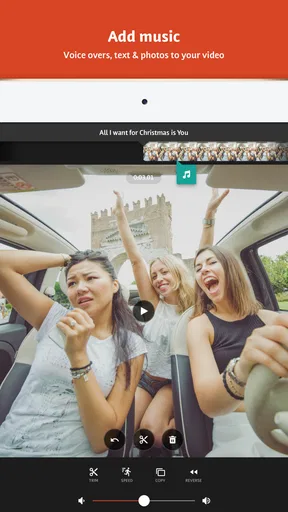
Adding music to your clips is a breeze. You can import your favorite tracks or explore the app’s built-in library. The ability to adjust audio levels and add fun sound effects makes the editing process feel more dynamic and, dare I say, professional.
Creative Liberty with Special Effects
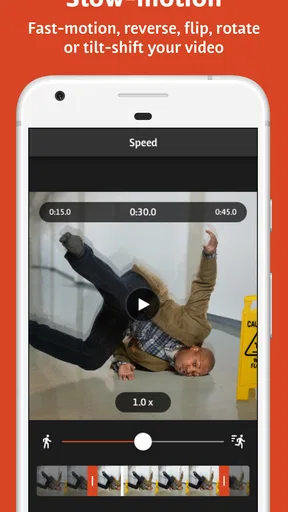
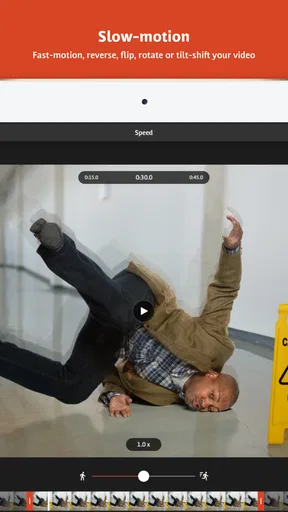
One thing that sets Videoshop apart is its special effects. You can add animated titles, adjust playback speed, or even play around with stop-motion. Imagine turning a simple birthday clip into a fast-paced, action-packed sequence. The possibilities are endless, and the app encourages you to experiment and have fun.
For those who love adding a comedic twist, the voiceover feature is a game-changer. Record your own voice or use the app’s voice modulation to create hilarious narrations. Trust me, it’s a hit at parties!
Sharing Your Masterpiece
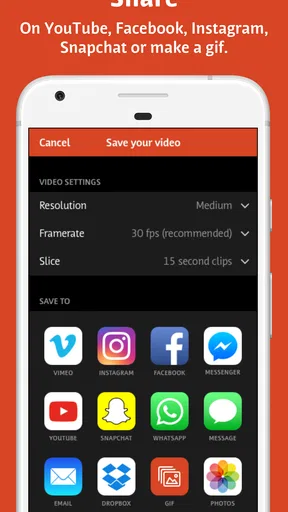
Once you’ve crafted your video to perfection, it’s time to share it with the world. Videoshop makes this process incredibly straightforward. You can share directly to social media platforms, or if you prefer, save it to your device in various resolutions. Whether it’s Instagram, YouTube, or just sending it to friends, the app handles it all seamlessly.
Worth Reading Before You Choose

EA SPORTS FC Mobile 26 Is a Bigger Football Game, but It Takes Time

Flipboard Shows What News Apps Must Do Beyond the Feed

Switching to Android Auto Means Rethinking Your Driving Routine

Google Calendar Makes a Crowded Week Easier to Manage

Ludo King Makes the Most of the Minutes Between Plans

Baby Panda World Brings Quick Play to Modern Phones, but Its Game Library Feels Busy
And here's a tip: take advantage of the app’s ability to export in HD. It’s a small detail that can make a big difference in how your video is received.
First edits that feel manageable
For a first project, I’d keep the goal modest: choose a handful of clips from one occasion, remove the pauses at the start and end of each, and arrange them so the action makes sense. That gives you a complete video before you have to decide whether a filter, title, or transition actually helps. Starting with a short sequence also makes it easier to notice awkward cuts and fix them while the project is still simple.
A useful detail is to think about sound before decorating the picture. If a clip has speech worth keeping, lower any added music so it supports rather than buries the voices. For a montage with no important dialogue, music can instead provide continuity between shots. I’d listen through once with the phone’s volume at a comfortable level before exporting; a mix that seems balanced while editing can feel very different when replayed casually.
A sensible workflow for everyday clips
Imagine recording a friend’s birthday: a quick greeting, candles being lit, the moment everyone sings, and a few reactions afterward. I would trim each clip to its useful moment, put the singing and candles near the center, and use a title only if it adds context. A restrained transition can soften a jump between locations, but using one between every shot can make a personal memory feel more like a template. The strongest edit is often the one that leaves the good moments room to breathe.
Speed changes and stop-motion invite a different kind of planning. They work best when the action is clear and the effect has a purpose, such as emphasizing a funny gesture or making a small sequence feel playful. I wouldn’t apply them just because they are available: too many changes in pace can distract from what is happening. Try one effect on a short section first, then decide whether it makes the clip more enjoyable.
What to expect before you begin
Videoshop is an approachable option for personal edits rather than a substitute for a full desktop editing setup. Its appeal is the range of creative choices gathered around straightforward jobs, so a beginner can make a compact video without first learning a complicated editing vocabulary. At the same time, having many effects does not automatically make every project better. If your priority is exact, highly controlled editing across a long production, a more advanced editor may be a better fit.
The app is free to download, with in-app purchases ranging from $0.99 to $39.99 per item. I’d treat that as a reason to explore the free experience before spending: first see whether the editing style and available tools fit your needs, then consider a purchase only if a specific option matters to your workflow. It is rated for Everyone, and the current version is 2.9.0, with Android 7.0 as the minimum operating-system requirement.
Where it fits among other editors
Compared with a basic trim-and-share tool, Videoshop gives you more ways to shape the mood of a clip through filters, transitions, titles, speed changes, and sound. Compared with a more elaborate editor, its beginner-friendly appeal is that you can focus on a personal sequence instead of navigating a deeper production workflow. That makes it a reasonable middle ground for social posts, family memories, and quick creative experiments. If your usual edits are only cutting off a few seconds, a simpler built-in editor may be faster; if you want precise control over a complex project, choose a more specialized tool.
One practical trade-off is that every extra layer—music, voiceover, titles, effects—takes attention to check. I’d save the version that tells the story clearly before trying embellishments, then compare the two. That simple check helps prevent a common first-project mistake: polishing the look while overlooking a confusing sequence or a voice that has become hard to hear.
When I’d recommend it, and when I wouldn’t
I’d recommend Videoshop to someone who has clips on a phone and wants to make them more coherent and expressive without beginning with an intimidating editing process. It suits casual creators who enjoy trying effects, parents putting together a short family recap, or friends making a playful birthday montage. The combination of trimming, audio options, titles, and speed adjustments gives a new user several ways to make a first edit feel personal.
I’d skip it if you don’t want to make creative choices and only need the quickest possible crop, or if your work depends on fine-grained control over a demanding, multi-part production. It may also take a little restraint for anyone tempted to use every effect at once. The app encourages experimentation, but a clean edit with a few purposeful choices is easier to watch and often feels more personal than a clip crowded with decoration.
Final Thoughts
All in all, Videoshop is a fantastic tool for anyone looking to dive into video editing without the steep learning curve. It’s packed with features that cater to both beginners and seasoned editors. The app's flexibility and ease of use make it a staple for anyone wanting to add a bit of flair to their videos.
So, if you're ready to unleash your inner Spielberg, give Videoshop a go. It’s an app that transforms ordinary clips into extraordinary stories, and honestly, who doesn’t love a good story?
Pros
- User-friendly interface for easy editing.
- Wide range of effects and filters available.
- Supports multiple video formats.
- Fast rendering and export options.
- Includes text and music overlay features.
Cons
- Limited advanced editing tools.
- Some features require in-app purchases.
- Occasional app crashes reported.
- No cloud storage integration.
- Basic color correction options.
FAQs for Videoshop - Video Editor
What features does Videoshop offer for video editing?
Videoshop provides a wide range of features for video editing, including trimming clips, adding music, inserting text, applying filters, and adjusting video speed. Users can also incorporate voiceovers, transitions, and sound effects to enhance their videos. These features make it a versatile tool for both beginners and experienced video editors.
Is Videoshop free to use, or are there in-app purchases?
Videoshop is free to download and use, but it does offer in-app purchases. These purchases unlock additional features and remove ads, providing a more comprehensive editing experience. Users can choose a subscription plan that best suits their needs, ensuring they have access to the full range of editing tools.
Can Videoshop handle high-resolution video editing?
Yes, Videoshop is capable of handling high-resolution videos, including HD and 4K footage. This capability allows users to produce high-quality content suitable for various platforms. However, editing high-resolution videos may require a device with sufficient processing power to ensure smooth performance.
Is Videoshop suitable for beginners in video editing?
Videoshop is an excellent choice for beginners due to its intuitive interface and easy-to-use tools. The app offers tutorials and guides to help new users get started. Its straightforward design ensures that even those with no prior editing experience can create polished videos quickly and efficiently.
How does Videoshop compare to other video editing apps?
Videoshop stands out due to its combination of user-friendly features and robust editing tools. While some apps may offer more advanced features, Videoshop strikes a balance between simplicity and functionality. This makes it a popular choice for users looking for an accessible yet powerful editing app.


